
Listonic vs Apple Reminders: which app actually works for grocery shopping?
A dedicated shopping list app against iPhone's built-in Reminders, which has had a real Groceries list type since iOS 17. I compare the two on what a weekly shop actually needs.

This comparison is based on Listonic's official Google Play and App Store listings and Apple's own App Store listing and support documentation for Reminders, checked August 31, 2026. Store ratings, pricing and feature availability can vary by country and storefront view, and Reminders' Groceries list type requires iOS 17 or later with iCloud enabled.
TL;DR
My recommendation
For a weekly grocery run, I would pick Listonic: it works on Android as well as iPhone, tracks item prices and a running total, and remembers what you buy. I would pick Reminders if everyone in the household is already on an iPhone or Mac, since its Groceries list type genuinely does sort items into store sections on its own, something I did not expect from a built-in reminders app [1, 2].
Choose Listonic
If you want a price on each item and a running total before the till, Reminders has no version of either, at any price, on any device. Listonic covers both, and works just as well on iPhone as it does everywhere else, not only when Android is involved.
Choose Reminders
If your household is all Apple devices already, and you would rather use the reminders app already on your phone than install a separate one, its Groceries list type covers the basics well.
Reminders is not the pushover a general notes app is here. Since iOS 17 it has a real Groceries list type that sorts items into store sections automatically, and it does that for free, on every device Apple makes [1, 2]. That reach shows in the review numbers too: in a full export of both apps' English-language App Store reviews since January 2023, Reminders collected roughly two and a half times as many iOS reviews with a comment as Listonic, 19,644 against 8,287.
What it does not have, on any device or at any price, is a way to attach a price to an item or see what the trip will cost, and it does not exist on Android at all. Those two gaps, not organisation, are where this comparison actually turns.
What to keep in mind when picking a grocery list app
Not every list app is built for grocery shopping, even a genuinely capable one. Here is what actually separates these two [1, 2].
Cross-platform households
Does the app work the same regardless of which phone everyone in the household carries?
Store-aware organization
Do items fall into the order you actually walk the store in, rather than the order you typed them?
Budget tracking
Can you see what the trip will cost before you reach the till, not just what you still need to buy?
Built for one job or many
Is the app built around grocery shopping specifically, or is a shopping list one of many kinds of reminders it holds?
Two apps built for different jobs
Listonic and Reminders overlap more than most matchups in this ranking, because Reminders genuinely tries to be good at grocery lists too, not just checklists in general [1, 2].
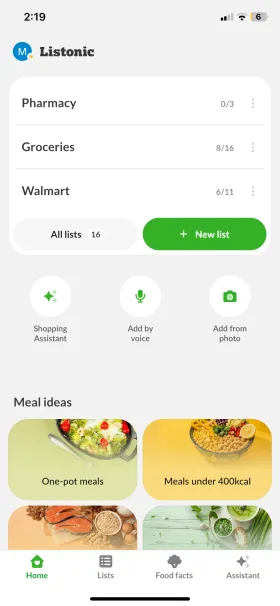
Listonic is primarily a grocery list app on Android and iOS, with prices, a running total and shopping history built in; its AI assistant can also put together a meal plan and turn it into a list, though shopping is what the app is built around.
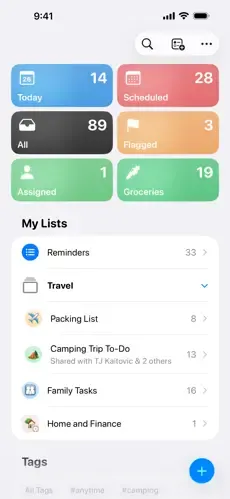
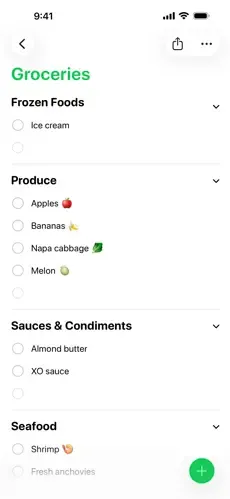
Reminders is Apple's built-in task and reminders app, with a dedicated Groceries list type since iOS 17 that automatically sorts items into store sections. It just does not exist outside Apple's own devices, and it has no idea what anything costs.

Listonic
A grocery list app that works the same on Android and iOS
Strongest documented strengths: Live list sharing, sorting by store category, item prices and a running total, history-based suggestions, voice input

Reminders
Apple's built-in reminders app, with a dedicated Groceries list type since iOS 17
Strongest documented strengths: Automatic sorting into store sections, tags, subtasks, reusable templates, Siri and Apple Intelligence integration, Apple Watch support
Who wins which question
My short answer is that Listonic is the better app for grocery shopping, but by a narrower margin than I expected: Reminders genuinely sorts a grocery list into store sections on its own [1, 2].
Where Listonic pulls ahead is the two things Reminders cannot do at any price: track what things cost, and run on Android.
Net positive, the share of 4–5★ reviews minus the share of 1–2★ ones, puts a number on that gap: 73.8% for Listonic on iOS against 55.1% for Reminders.
| Question | Better app | Why |
|---|---|---|
| Best app for a mixed-OS household | Listonic | Listonic works the same on Android and iOS; Reminders does not exist on Android at all |
| Best for sharing a list with the household | Listonic | Both sync well and both support shared lists, but only Listonic reaches every phone in the house |
| Best for staying on budget | Listonic | Item prices and a running list total; Reminders has neither, on any device |
| Best in the store, by aisle | Listonic | Reminders' Groceries list type genuinely auto-sorts into sections too, but Listonic's categories and suggestions are tuned specifically for shopping, not adapted from a general task list |
| Best free tier | Listonic | Listonic gives away sorting, prices and totals for free; Reminders gives away its whole feature set too, but has no price or budget tools to include at any price |
| Best for managing more than groceries | Reminders | Tags, subtasks, reusable templates and deep Siri integration; Listonic does not try to be a general task manager |
How I scored the two apps
I weighted the scores because these two apps aren't chasing the same list of jobs, and Reminders' one category win is real enough to carry its full weight here rather than being smoothed away [1, 2].
| Category | Weight | Listonic | Reminders |
|---|---|---|---|
| Speed & ease of shopping Both apps make adding an item quick, Reminders through mature Siri dictation, Listonic through history-based suggestions built specifically for a shopping list. | 20% | 9.2 | 7.0 |
| List organization & sorting Reminders' Groceries list type genuinely auto-sorts into roughly twenty store-style sections and remembers your corrections, which is real credit. Listonic's categories and their order are tuned for a store from the ground up rather than adapted from a general reminders list. It shows in the reviews: the phrase "shopping list" appears in 8.2% of Listonic's positive iOS reviews, against 5.8% of Reminders'. | 15% | 9.4 | 7.5 |
| Budgeting & item prices The widest gap in the comparison: prices against items and a running total against no equivalent of any kind, on any Apple device. | 15% | 9.0 | 1.0 |
| Sharing & syncing Both sync well and both support shared lists, but only Listonic reaches an Android phone in the same household. The word "sharing" turns up in 6.3% of Listonic's positive iOS reviews, against 3.2% of Reminders'. | 15% | 9.0 | 8.0 |
| Free-tier value for shopping Reminders' entire Groceries feature set is free, which is real and counts for something. Listonic still leads because it adds prices and a running total, which Reminders has no version of at any price. | 15% | 9.0 | 6.5 |
| Versatility beyond shopping Tags, subtasks, reusable templates, and Apple Intelligence pulling ingredients out of a Safari page or an email already sorted. Listonic has nothing to put against any of it and does not try to. It shows in how reviewers describe the app: the word "reminders" itself appears in 27.0% of Reminders' positive iOS reviews, against 0.2% of Listonic's. | 20% | 4.0 | 9.0 |
| Weighted total | 100% | 8.1 | 6.7 |
| Categories won | 6 | 5 | 1 |
Keep in mind
These are my own editorial scores, based on features I verified in Apple's own documentation and Listonic, not on lab benchmarks. Reminders' Groceries list type is more capable than I expected going in, and the organisation score reflects that rather than assuming a system reminders app has nothing to offer here. It's also worth saying plainly where the review numbers actually land: among iOS reviews that leave a comment, Listonic still averages higher than Reminders, 4.40 against 4.03, but counting every star rating logged since 2023, not only the commented ones, Reminders edges ahead, 4.822 to Listonic's 4.650 — a system app this widely installed earns a lot of quick five-star taps, and I'm not going to pretend otherwise.
Where these facts come from
I built this article from Listonic's official storefront listings, Apple's own App Store listing and support documentation for Reminders, and a full export of both apps' iOS reviews, not from assuming a system app has nothing to check.
I checked the features in the table against Apple's own support pages for Reminders and Listonic's official listings. Ratings and review counts come from the App Store and Google Play listings [1, 2].
Reminders has no Google Play listing and no download count in the usual sense, since it ships pre-installed with iOS; its App Store rating is the one public figure Apple does publish.
The review-based figures woven into the scoring, TL;DR and deep-dive sections above are a full export, not a sample: every English-language App Store review either app received between January 2023 and July 2026. It counts every star rating too, not just the ones with a comment, and says so where that number is the one being used [4, 5].
| Source type | What it was used for |
|---|---|
| Official product pages, app descriptions and support documentation | Claimed features, what the app costs and what, if anything, a subscription unlocks |
| Google Play and App Store listings | Ratings and review counts |
| Review-data export (Jan 2023 – Jul 2026) | What people actually say in a review: volume, star average, and recurring themes |
Both apps in numbers
What each app does well and where it falls short, with the storefront numbers beside the name [1, 2].
Listonic
Android: 10M+ downloads, 4.6/5 from 296K reviews · iOS: 4.8/5 from 24.6K ratings
Best for
- Households where not everyone carries an iPhone
- Anyone who wants to see what the trip will cost before the till
Key pros
-
Works the same on Android and iOS
-
Item prices and a running list total
-
Remembers frequently bought items and suggests them for the next list
-
Items can be added by voice, built for a shopping list specifically
Key cons
-
No general tags or subtasks system for organizing a list
Reminders
Best for
- All-Apple households who would rather not install another app
- Anyone who wants tags, subtasks and Siri built into the same app as their groceries
Key pros
-
Groceries list type auto-sorts items into roughly twenty store sections, for free
-
Deep Siri and Apple Intelligence integration, including pulling ingredients from a webpage or email
-
Tags, subtasks and reusable list templates for everything else you track
-
Works on iPhone, iPad, Mac, Apple Watch and the web at icloud.com
Key cons
-
No Android app or Google Play listing at all
-
No item prices or running total of any kind
-
No shopping-specific purchase history, only category memory
What users say
This is a newly published comparison with no source article to pull review quotes from, so I am not filling this slot with something written to sound like one. The ratings above come straight from each app's own storefront listing [1, 2].
What actually decides it
Three things that decide it in practice, and the first one has nothing to do with features at all.
Reminders doesn't exist on Android
This is the one fact that ends the comparison for a lot of households before any feature gets compared: Reminders is an Apple app, full stop. If even one person doing the shopping carries an Android phone, Listonic is the only option of the two [1, 2].
No price ever appears next to an item
Reminders' Groceries list type is genuinely good at sorting, but it has no field for a price, no running total, and no version of either at any price tier, on any Apple device. Listonic has both for free.
The organisation gap is smaller than I expected
I went into this expecting a repeat of a general notes app with nothing built for shopping. Reminders auto-sorts groceries into store sections and remembers your corrections, which is a real, checkable feature, not marketing copy.
What each app is built around
The real difference between these two apps is not who sorts better. It's what happens after the list is sorted [1, 2].
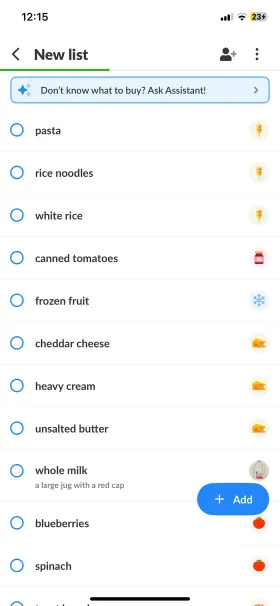
Listonic tracks what things cost: a price on each item, a running total before the till, and a history of what you buy so the next list starts half-built.
Reminders tracks what needs doing: it sorts groceries well, but a checked-off item just disappears, the way any reminder does. There is no price, no total, and no memory of what you tend to buy beyond which section it belongs in.
That is a reasonable place for a reminders app to stop. It is also exactly the gap a dedicated grocery app exists to fill.
It shows in how each company treats its own reviews, too: across a full export of App Store reviews since January 2023, Apple has not replied to a single Reminders review in any year of the dataset, 2023 through 2026, while Listonic answers between a fifth and a third of its own every year, including 86.2% of its own 1-star reviews, exactly where a reply matters most.
That same review average has favoured Listonic every year since 2023, too: its iOS reviews have outscored Reminders' by at least 0.36 of a star in every one of the last four years.
Four things you do every week
The four actions that come up most often on a weekly shop, and how each app handles them [1, 2].
| Task | Listonic | Reminders | Winner |
|---|---|---|---|
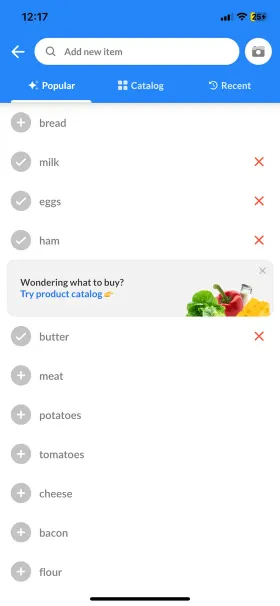
| Build a list from scratch | Suggestions from your shopping history, plus voice input built for a list | Siri dictation or typed entry, with items auto-sorted into sections as you go | Listonic |
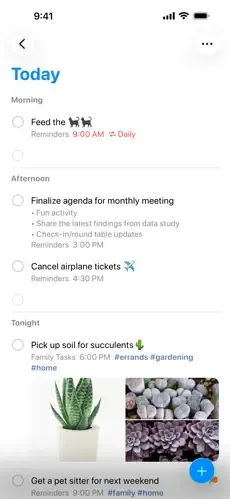
| Order the list for the store layout | Automatic sorting by category, with your own category order | Automatic sorting into roughly twenty sections, with draggable section order | Listonic / Reminders |
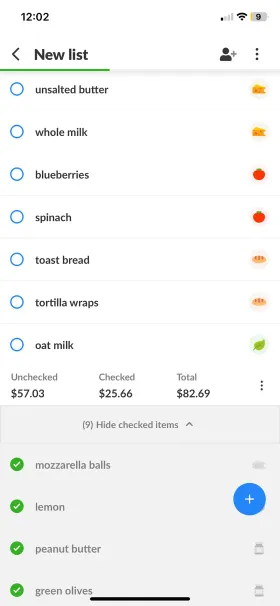
| Check what the trip will cost | Prices against items and a running list total | No prices and no total, on any Apple device | Listonic |
| Share the list with an Android phone in the house | Works the same for everyone, any phone | Not possible: Reminders has no Android app or web login for non-Apple accounts | Reminders |
The store-sorting task is closer than any other rival in this ranking gets. It's the price and platform questions below it that still decide things.
The free tier and what, if anything, costs money
Listonic is freemium; Reminders is free the way anything built into iOS is free, with no paid tier at all [1, 2].
With Listonic, most features are free. Upgrading to premium removes ads and unlocks appearance settings, but even the free version covers what most people need for a weekly shop.
Reminders has never had a paid tier, on any Apple device. Its entire Groceries feature set, sorting included, is free, the same way every other part of the Reminders app is.
| Pricing angle | Listonic | Reminders | My take |
|---|---|---|---|
| What you get without paying | Unlimited lists, sorting, custom categories, prices and totals, item photos, shopping history and voice input | Unlimited lists, automatic store-section sorting, tags, subtasks and templates: everything Reminders does | Listonic gives away prices and a running total that Reminders has no version of at any price |
| What a paid tier unlocks | Ad removal, plus themes and display settings | Nothing. There is no paid tier to unlock anything with | Reminders has nothing held back, because it has nothing to sell |
Free features, side by side
Most of the same core shopping-list rows every comparison in this section uses, plus two rows for what Reminders does that a shopping list app doesn't attempt [1, 2].
| Feature | Listonic | Reminders |
|---|---|---|
| iOS/Android app | Yes | Partial iPhone, iPad and Mac only; no Android app |
| Web app | Yes | Yes icloud.com, requires an Apple Account |
| Home screen widget | Yes | Yes |
| Unlimited lists | Yes | Yes |
| Real-time sync | Yes | Yes |
| Product suggestions | Yes | Partial remembers section corrections, not purchase history |
| Quantities, units and notes on items | Yes | Partial notes and subtasks, no structured quantity or unit fields |
| Automated sorting | Yes | Yes |
| Custom sorting | Yes | Yes |
| Customize the category order | Yes | Yes |
| Add your own categories | Yes | Yes |
| Shopping history | Yes | No |
| Voice input | Yes | Yes |
| Add item prices | Yes | No |
| Total cost calculation | Yes | No |
| Item photos | Yes | No |
| Apple Watch support | No | Yes |
| Premium plan | Yes | No |
| Tags for custom smart lists | No | Yes |
| Subtasks within a single item | No | Yes |
| Ad-free | No premium only | Yes always |
FAQ
Why use Listonic instead of the Reminders app already on my phone?
Because Reminders can't do two things Listonic does for free: put a price on an item with a running total before the till, and work the same way if anyone in the household is on Android. Reminders sorts a grocery list well, but the list stops there.
Can I use Reminders to share a grocery list with someone on Android?
No. Reminders has no Android app and no way for a non-Apple account to view or edit a shared list. If anyone in the household is on Android, Listonic is the option that reaches everyone.
Which app is better for staying on budget?
Listonic, by the widest margin in this comparison. It attaches a price to each item and keeps a running total; Reminders has no equivalent of either, on any device or at any price.
Will Listonic replace Reminders for me?
For the shopping list, yes, and it also reaches Android. For everything else Reminders does, no: Listonic has no tags, subtasks, reusable templates or general task management. If you use Reminders for more than groceries, Listonic is a companion to it, not a replacement.
The bottom line
Final verdict
For the shopping list, I think Listonic is clearly the better tool, mainly on two things Reminders cannot do at any price: track what a trip costs, and reach an Android phone. Reminders wins on managing more than groceries in one app.
Reminders is a more capable grocery-list rival than a general notes app, and its Groceries list type deserves the credit this article gives it. Where it still falls short of Listonic is price tracking, which it has no version of at all, and reach beyond Apple's own devices, which it has none of by design [1, 2].
