
Listonic vs Google Keep: which app actually works for grocery shopping?
A dedicated shopping list app against Google's free note-taking app, repurposed as a checklist. I compare the two on what a weekly shop actually needs.

This comparison is based on both apps' official Google Play and App Store listings and Google Keep's own help-centre description, checked August 31, 2026. Store ratings, pricing and feature availability can vary by country and storefront view.
TL;DR
My recommendation
For a weekly grocery run, I would pick Listonic: it sorts items by store category, holds a price against each one, keeps a running total, remembers what you buy and takes voice input built for a shopping list, and Keep has none of those. I would pick Keep when the list is one of many kinds of notes you keep, and you want it alongside reminders and photos in one free app [1, 2].
Choose Listonic
If the shopping list is the reason you are opening an app at all: you want items ordered the way you walk the store, the cost visible before the till, and a list that remembers what you buy every week.
Choose Google Keep
If you already live in Google Keep for notes, reminders and photos, and a shopping list is just one more checklist among them, with a Chrome extension and Wear OS support along for the ride.
Both apps are free, and both sync in real time, so the difference is not there. It comes down to how much of each app is actually built for buying groceries, rather than for notes in general [1, 2].
Keep can hold a shopping list the same way it holds a packing list, a book list or a meeting agenda: as a checklist with no idea what a grocery store is. Listonic exists for exactly one kind of list. That shows up in a full export of both apps' English-language reviews since January 2023: Keep collects roughly eight times as many Android reviews (62,755 against Listonic's 7,857), simply from shipping on every Android phone, but on iOS, where the two audiences are closer in size, Listonic's reviews average 4.40 out of 5 against Keep's 3.01.
What to keep in mind when picking a grocery list app
Not every app that can hold a checklist is built for grocery shopping. Here is what actually separates these two [1, 2].
Real-time syncing
Does everyone at home see the same list at the same moment, without refreshing it or sending it to each other?
Store-aware organization
Do items fall into the order you actually walk the store in, rather than the order you typed them?
Budget tracking
Can you see what the trip will cost before you reach the till, not just what you still need to buy?
Built for one job or many
Is the app built around grocery shopping specifically, or is a shopping list one of many kinds of notes it holds?
Two apps built for different jobs
Listonic and Google Keep solve different problems that happen to overlap at "a list of things to buy" [1, 2].
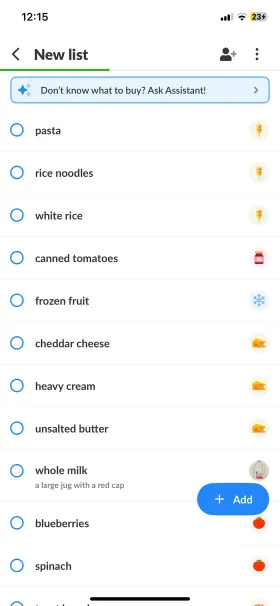
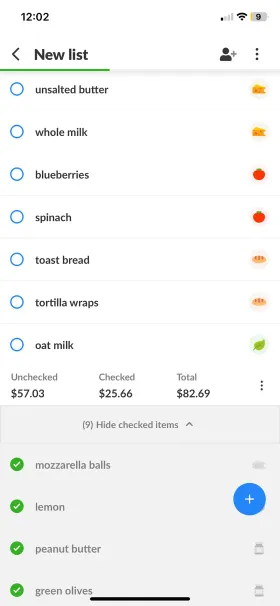
Listonic is a grocery list app and nothing else: sorting, prices, notes and shopping history all exist to make one weekly errand faster.
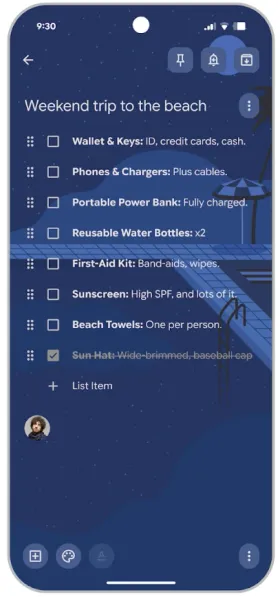
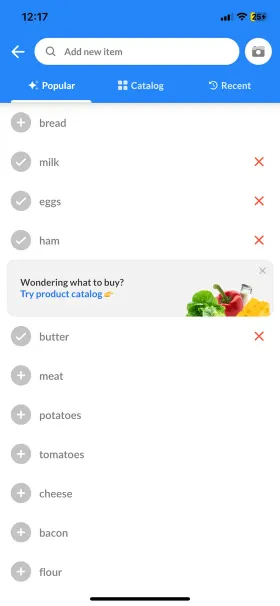
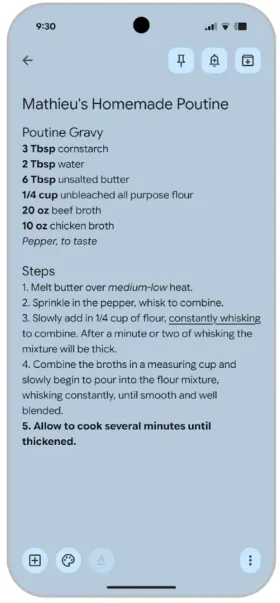
Keep is Google's general note-taking app. A checklist is one of several note types it supports, alongside text notes, photos and voice memos, and it treats a shopping list exactly the same way it treats any other checklist.

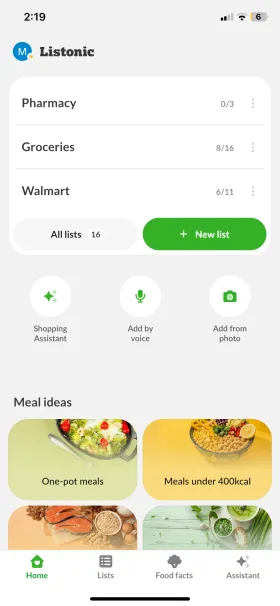
Listonic
A grocery list app you can share with the whole household in real time
Strongest documented strengths: Live list sharing, sorting by store category, item prices and a running total, history-based suggestions, voice input

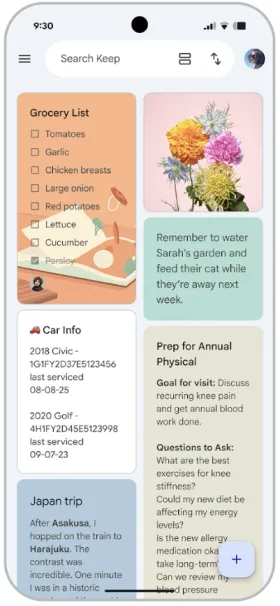
Google Keep
A free, general-purpose note-taking app with checklists, reminders and photos
Strongest documented strengths: Real-time collaboration, colour labels, time and location reminders, text search inside photos, a Chrome extension and Wear OS support
Who wins which question
My short answer is that Listonic is the better app for grocery shopping, because Keep was never built to be one: it has no idea what a store aisle is [1, 2].
That is not the whole story, though. Where Keep wins is being useful for far more than groceries, not on the shopping list itself.
Net positive, the share of 4–5★ reviews minus the share of 1–2★ ones, tells a similar story: 72.6% for Listonic against 55.0% for Keep on Android, and a lopsided 73.8% against just 3.2% on iOS.
| Question | Better app | Why |
|---|---|---|
| Best app for the shopping list itself | Listonic | Store categories, prices, a running total and shopping history: Keep has none of them |
| Best in the store, by aisle | Listonic | Automatic sorting and a custom category order; Keep only lets you drag items within one flat list |
| Best for staying on budget | Listonic | Item prices and a running list total; Keep has neither |
| Best for sharing a list with the household | Listonic | Both sync live, but only Listonic hands the other person a list already sorted into store categories |
| Best free tier | Listonic | Every shopping feature in Listonic is free; Keep has no shopping-specific features to give away at any price |
| Best for capturing more than groceries | Google Keep | Labels, location reminders and photo text search, on a platform with a billion-plus installs; Listonic does not try to be a general notes app |
How I scored the two apps
I weighted the scores because these two apps are not aimed at the same job: the category Keep wins outright is real, and it gets its weight in this table instead of disappearing [1, 2].
| Category | Weight | Listonic | Google Keep |
|---|---|---|---|
| Speed & ease of shopping History-based suggestions and voice input built for a shopping list shorten the most repeated action there is: adding another line. Keep is fast to type into, but has neither. Reviewers agree: the theme "simple and easy" appears in 34.4% of Listonic's positive Android reviews, against 7.7% of Keep's. | 20% | 9.2 | 6.5 |
| List organization & sorting Listonic sorts by category automatically and lets you set that order for one specific store; Keep only supports dragging individual items up and down one flat list. Reviewers notice: the phrase "shopping list" turns up in 21.0% of Listonic's positive Android reviews, against 1.8% of Keep's. | 15% | 9.4 | 2.0 |
| Budgeting & item prices The widest gap in the comparison: prices against items and a running total against no equivalent of any kind. | 15% | 9.0 | 1.0 |
| Sharing & syncing Both sync live and both work well for a household splitting the shopping, but only Listonic hands the other person a list already organized for the store. | 15% | 9.0 | 8.0 |
| Free-tier value for shopping Every shopping feature Listonic has, sorting, prices, totals, suggestions, voice, is free. Keep's free tier covers notes and reminders well but has nothing built for a grocery list at any price. | 15% | 9.0 | 4.0 |
| Versatility beyond shopping Labels, time and location reminders, text search inside photos, a Chrome extension and Wear OS support. Listonic has nothing to put against any of it and does not pretend otherwise. It shows in how people describe each app: the word "notes" appears in 18.1% of Keep's positive Android reviews and 21.0% of its positive iOS reviews, against 1.3% and 0.4% of Listonic's. | 20% | 4.0 | 9.5 |
| Weighted total | 100% | 8.1 | 5.5 |
| Categories won | 6 | 5 | 1 |
Keep in mind
These are my own editorial scores, based on features I verified in both apps and on their published store listings, not on lab benchmarks. Keep's free tier covers everything the app does, but almost none of that is built for a grocery list, and the free-tier score reflects that rather than passing over it. I'll also concede the one place Google genuinely does better: in a full export of both apps' reviews since January 2023, 98.7% of Google's developer replies on Android landed within 24 hours, against 25.0% of Listonic's, even though Listonic answers a larger share of its own reviews across the year. Counting every star rating either app has ever received, not just written reviews, Listonic still edges ahead on both platforms: 4.689 against 4.641 on Android, and 4.650 against 4.591 on iOS.
Where these facts come from
I built this article from both apps' official Google Play and App Store listings, Google Keep's own help-centre description, and a full export of both apps' reviews, not from skimming one product page.
I checked the features in the table in both apps and set them against what each maker claims on its own storefront listing. Ratings, download counts and review counts come from the Google Play and App Store listings [1, 2].
Google Keep's Apple Watch app was discontinued in 2025, which the feature table reflects as it stands today rather than as it was while that app still existed.
The review-based figures woven into the scoring and TL;DR sections above are a full export, not a sample: every English-language Google Play and App Store review either app received between January 2023 and July 2026 [2, 3, 4, 5].
| Source type | What it was used for |
|---|---|
| Official product pages and app descriptions | Claimed features, what the app costs and what, if anything, a subscription unlocks |
| Google Play and App Store listings | Ratings, review counts and download counts |
| Review-data export (Jan 2023 – Jul 2026) | What people actually say in a review: volume, star average, and recurring themes |
Both apps in numbers
What each app does well and where it falls short, with the storefront numbers beside the name [1, 2].
Listonic
Android: 10M+ downloads, 4.6/5 from 296K reviews · iOS: 4.8/5 from 24.6K ratings
Best for
- Families, couples and housemates splitting the shopping
- Anyone whose main reason for opening an app is the list itself
Key pros
-
Real-time syncing across the whole household
-
Automatic sorting by grocery store section
-
Remembers frequently bought items and suggests them for the next list
-
Items can be added by voice, built for a shopping list specifically
Key cons
-
No location-based reminders, labels or photo text search
-
Not built to hold anything other than a shopping list
Google Keep
Best for
- Anyone who already keeps every kind of note in Google Keep
- People who want one free app, with zero ads, for lists, reminders and photos
Key pros
-
Completely free, with no ads and no paid tier at all
-
Real-time collaboration on shared checklists
-
Reminders by time or location, and text search inside photos
-
Works on Android, iOS, the web, Chrome and Wear OS
Key cons
-
No store categories, item prices or running total of any kind
-
List items can only be reordered by hand, one at a time
-
No shopping-specific suggestions or history
What users say
This is a newly published comparison with no source article to pull review quotes from, so I am not filling this slot with something written to sound like one. The ratings above come straight from each app's own storefront listing [1, 2].
What actually decides it
Three things that decide it in practice, and only one of them is about the number of features.
Six feature-table rows are the whole gap
Listonic wins on category sorting, prices, a running total, shopping history and voice input built for a list. Keep wins on everything that is not groceries: labels, reminders and photo text search. That is the whole difference between these two apps, summarised in one table [1, 2].
Every shopping feature in Listonic costs nothing
Sorting, prices, a running total, suggestions and voice are all in Listonic's free tier, with nothing held back for payment. Keep's free tier is generous too, but there is nothing shopping-specific in it to hold back in the first place, because Keep was never built around a grocery list [2].
A checklist is not a shopping list
Keep treats "milk, eggs, bread" exactly the way it treats a packing list or a meeting agenda: as lines you can check off, nothing more. Listonic knows which aisle milk is in, what it costs, and that you buy it every week.
What each app is built around
The real difference between these two apps is not features. It's what each one assumes you are making a list of [1, 2].
Listonic assumes every list is a grocery list: it sorts items the way a store is laid out, remembers what you buy every week, and shows a running total before you reach the till.
Keep assumes nothing about what you are listing. A shopping list, a packing list and a list of book titles all look identical in Keep: lines with checkboxes, in the order you typed them or dragged them into.
That is not a flaw in Keep. It is a genuinely useful, completely free note-taking app that happens to also hold a checklist. The only question is which of the two things you actually need this week.
It also shows up in the review data every single year: from 2023 through the first seven months of 2026, Listonic's iOS review average has topped Keep's every year, by at least a full star and as much as 1.91.
Four things you do every week
The four actions that come up most often on a weekly shop, and how each app handles them [1, 2].
| Task | Listonic | Google Keep | Winner |
|---|---|---|---|
| Build a list from scratch | Suggestions from your shopping history, plus voice input built for a list | Every line typed or dictated as a note, then checked off one at a time | Listonic |
| Order the list for the store layout | Automatic sorting by category, with your own category order | Manual drag-to-reorder only; no store categories exist | Listonic |
| Check what the trip will cost | Prices against items and a running list total | No prices and no total, in Keep or anywhere in the app | Listonic |
| Keep the list for other things too | Built for shopping only | The same checklist holds packing lists, agendas or anything else, with labels and reminders attached | Google Keep |
None of that matters if you were never going to use a shopping-specific app in the first place. Keep is genuinely better at being the one app for everything else.
The free tier and what, if anything, costs money
Listonic is freemium; Keep isn't the kind of app that has a premium tier at all [1, 2].
With Listonic, most features are free. Upgrading to premium removes ads and unlocks appearance settings, but even the free version covers what most people need for a weekly shop.
Keep has never had ads and has never sold a subscription. It's free the same way the rest of a Google account is free: paid for by everything else Google does, not by this one app.
| Pricing angle | Listonic | Google Keep | My take |
|---|---|---|---|
| What you get without paying | Unlimited lists, sorting, custom categories, prices and totals, item photos, shopping history and voice input | Unlimited notes and checklists, labels, reminders, photo text search and real-time collaboration: everything Keep does | Listonic gives the whole shopping feature set away free |
| What a paid tier unlocks | Ad removal, plus themes and display settings | Nothing. There is no paid tier to unlock anything with | Keep has nothing held back, because it has nothing to sell |
Free features, side by side
Nineteen core shopping-list rows, the same set every comparison in this section uses, plus three rows for what Keep does that a shopping list app doesn't attempt [1, 2].
| Feature | Listonic | Google Keep |
|---|---|---|
| iOS/Android app | Yes | Yes |
| Web app | Yes | Yes |
| Android widget | Yes | Yes |
| Unlimited lists | Yes | Yes |
| Real-time sync | Yes | Yes |
| Product suggestions | Yes | No |
| Quantities, units and notes on items | Yes | No |
| Automated sorting | Yes | No |
| Custom sorting | Yes | Yes |
| Customize the category order | Yes | No |
| Add your own categories | Yes | No |
| Shopping history | Yes | No |
| Voice input | Yes | Partial records a note, not per-item list entries |
| Add item prices | Yes | No |
| Total cost calculation | Yes | No |
| Item photos | Yes | No a note can hold one photo, not per checklist item |
| Wear OS support | No | Yes |
| Premium plan | Yes | No |
| Colour-coded labels for organizing notes | No | Yes |
| Time or location-based reminders | No | Yes |
| Chrome browser extension | No | Yes |
| Ad-free | No premium only | Yes always |
FAQ
Does Google Keep work for grocery shopping?
It can hold a checklist, but it has no store categories, no item prices and no running total, and list items can only be reordered by hand. If grocery shopping is the main thing you want an app for, Listonic covers all four; Keep covers none of them.
Is Google Keep really free, with no ads?
Yes. Keep has never shown an ad and has no premium plan to buy. Listonic's free tier is generous too: sorting, prices, totals, suggestions and voice input are all included at no cost.
Which app is better for sharing a list with the household?
Both sync in real time and both work well for this. The difference is what the other person receives: in Listonic, an already-sorted list with prices attached; in Keep, the same flat checklist you typed.
Will Listonic replace Google Keep for me?
For the shopping list, yes. For everything else Keep does, no: Listonic has no general notes, no reminders, no labels and no photo text search. If you use Keep for more than groceries, Listonic is a companion to it, not a replacement.
The bottom line
Final verdict
For the shopping list, I think Listonic is clearly the better tool: it has store categories, prices, totals, suggestions and voice, all free, none of which Keep has at all. Keep wins on being useful for far more than groceries, not on the shopping list itself.
When it comes to grocery shopping itself, I find Listonic the far more capable tool: every feature in it exists to make one weekly errand faster, and it shows in every row of the feature table. If what you actually want is one free app for every kind of list, note and reminder you keep, Keep is the right choice, and Listonic was never trying to be that [1, 2].
