Dark mode for a list you read in the store
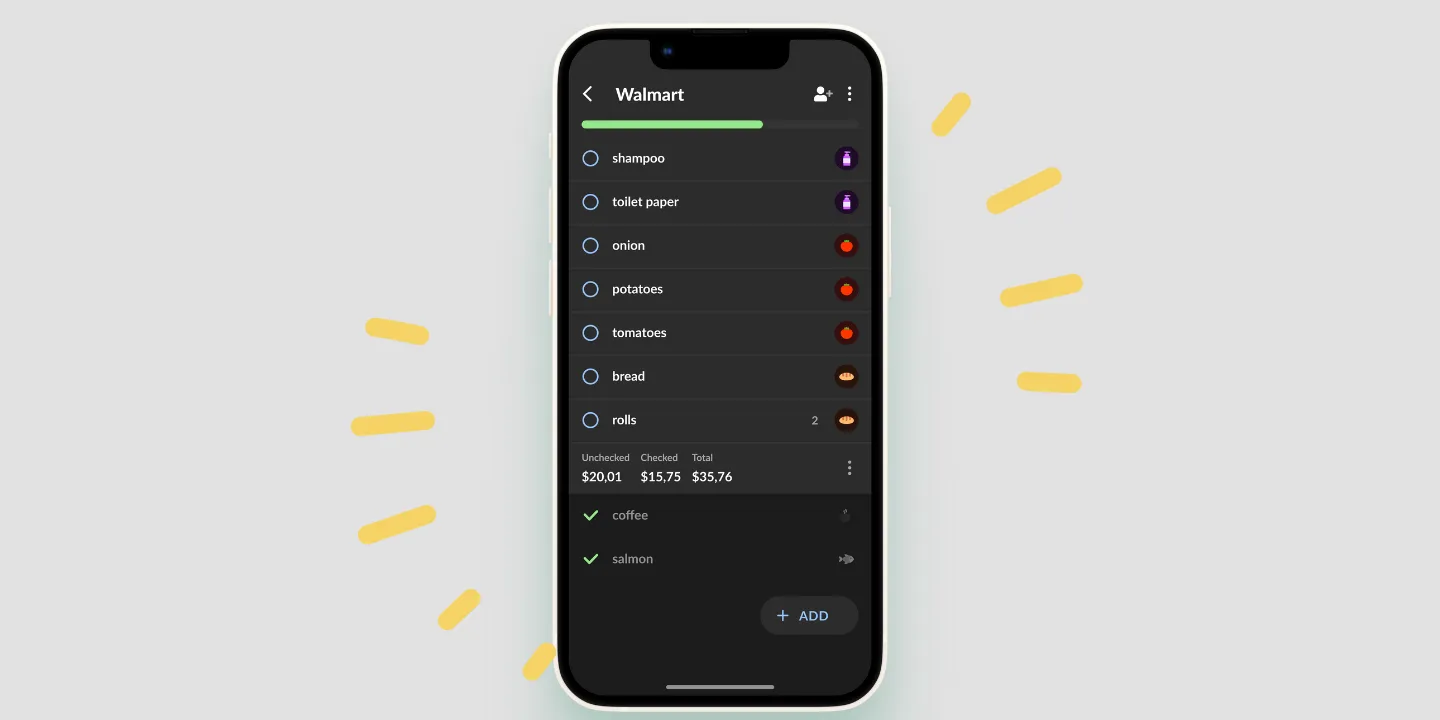
Dark mode switches the Listonic list to a dark background. Turn it on in the app settings, or hand the choice to the phone’s system theme so the list follows everything else. It cuts glare in fluorescent store aisles and on early-morning or late-night trips, and it lets you run a lower screen brightness. The layout, the categories and the totals stay exactly as they are in light mode.
Key takeaways
- Dark mode can be set inside Listonic, or left to follow the phone’s system theme so the list changes with everything else.
- The point is glare: a bright white list under fluorescent store lighting is harder to read than a dark one, and the same is true at 6am.
- Nothing functional changes. The layout, the categories, the totals and every feature behave exactly as they do in light mode.
- Any battery saving depends on the screen: on an OLED phone dark pixels genuinely use less power, on an LCD the backlight runs regardless.
A white screen at 6am is a small act of violence. So is one held up under the lighting rig of a supermarket aisle. Dark mode turns the Listonic list dark so it stays readable in both.
Two ways to switch it on
In the app settings. Turn it on and the list stays dark whatever the phone is doing.
By following the system theme. Hand the decision to the phone, and the list turns dark when everything else does, including on whatever schedule the phone runs.
The second is the one most people want, because it means never thinking about it again. The first is for anyone who wants the list dark and the rest of their phone left alone.
What it’s actually for
Glare, in two situations that have nothing to do with taste.
Store lighting. Fluorescent tubes plus a bright white screen is a bad combination, and you’re reading the list in short glances between shelves rather than sitting with it.
Early and late. At 6am or at 11pm your eyes have adjusted to low light, and a white list resets that every time you look down.
Neither is about the app looking modern. They’re about whether the thing is legible at the moment you need it.
The battery question, honestly
Dark mode is often sold as a battery saver, and whether that’s true depends on the screen in your hand.
On an OLED screen, a black pixel is an unlit pixel. A dark list genuinely draws less power, and the effect is real rather than theoretical.
On an LCD screen, the backlight is on regardless of what’s being displayed. Dark mode changes what you see and not what the screen costs.
What helps on both is brightness: a dark list is comfortable at a lower setting than a white one, and brightness is the part of screen power you control directly.
Nothing else changes
The list is the same list. Categories group the same way, totals sit in the same place, checking off works the same, sharing works the same. Only the colors differ.
That’s worth stating because it’s the risk with a theme: a dark version that hides something, or moves it, or renders the checked-off items so faint they’re gone. This one is a repaint.
Where dark mode works
| Platform | Dark mode |
|---|---|
| Android | Yes |
| iPhone and iPad | Yes |
How it compares to other list apps
For how Listonic holds up against other list apps overall, see our head-to-head comparisons of the main grocery list apps.
FAQ
How do I turn on dark mode in Listonic?
Switch it on in the app settings, or set it to follow the phone’s system theme. With the system option, the list turns dark whenever the rest of the device does, including on a schedule if the phone has one.
Does dark mode save battery?
On a phone with an OLED screen, yes: dark pixels are unlit ones, so a dark list genuinely draws less power. On an LCD screen the backlight is on regardless of what is displayed, so the saving is close to nothing. Being able to run a lower brightness helps on both.
Does anything on the list work differently in dark mode?
No. The layout, the categories, the totals and every feature stay as they are. Only the colors change, which is the entire point: the list has to be the same list in a dark aisle.
Why would I want a dark grocery list?
Glare, mostly. A white screen under fluorescent store lighting is harder to read than a dark one, and it is worse again on an early-morning or late-night trip when your eyes have adjusted to low light.